
 English
  Français
Chapter 6: The if, elif, else conditions
Conditions are an essential part of any computer code, regardless of the language used.
They allow you to do tests and execute code based on the result. 😎
| if | Evaluates whether the result of the condition is True or False |
| else | Executes the following code if the condition given by the if is False |
| elif | Executes a new condition (a new if ) if the previous if is False |
Booleans (seen previously) are often used with conditions. Indeed, as these can only have two values: either True, or False, they allow decisions to be made easily.
So, for example, if we create a video game, we can create a boolean isJumping. If it is True, then our character will be jumping, otherwise, he will walk on the ground. This will be useful for managing animations or movements. 😉
Comparison operators
Conditions are also often used with comparison operators, which allow you to compare two values / variables with each other. For example, the "equal to" operator (==) allows you to check if two values are equal, and returns True if they are, or False if they are not.
Here is the list of comparison operators :
| == | Equal to (not to be confused with = which assigns a value to a variable!) |
| != | Different from |
| > |
Strictly greater than |
| >= |
Greater than or equal to |
| < |
Strictly less than |
| <= | Less than or equal to |
Let's look at some examples to make this more concrete. 😉
Let's take our previous code and modify it!
nb1 = int(input("Enter your first number: "))
nb2 = int(input("Enter your second number: "))

#This is a comment, it starts with a hashtag and
#is not executed by the computer. You can write
#whatever you want!

#We will test if nb1 is greater or less than nb2
if nb1 > nb2 :
    print(nb1, " is greater than ", nb2)
else :
    print(nb1, " is less than ", nb2)
If we execute it, it gives us:
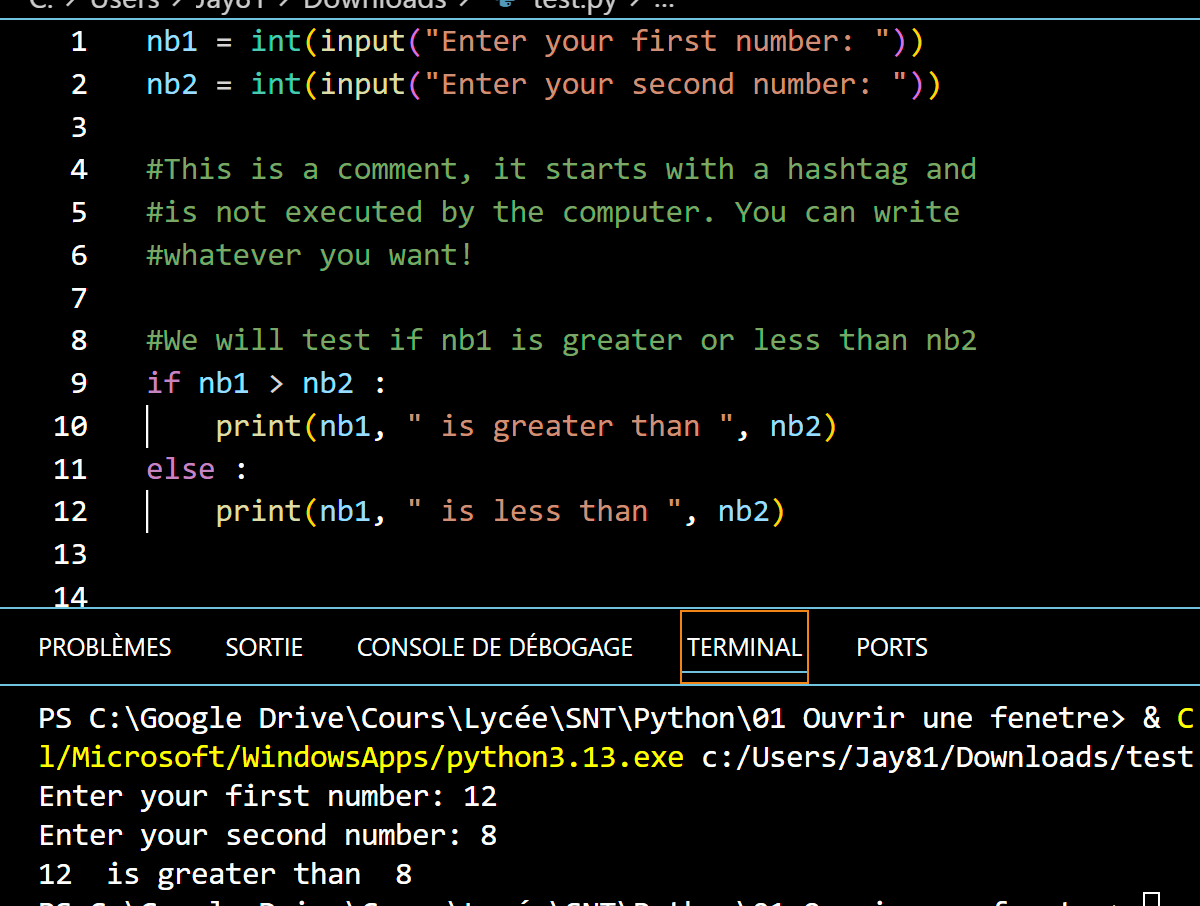
There are several things we will note that we have not seen yet:
- First, we can comment our code at any time by using the hashtag # at the beginning of the line. This is a good practice to take in order to note the function of this or that part of the code, to find it later and also so that someone else who reads your code, understands more easily what you are doing.
- Then, the if, elif and else conditions are always followed by the 2 dots : - If you forget them, it won't work! And this is a common beginner's mistake!
- Indentation: This is very important! You must leave a space using the TAB key under the conditions in order to know which code will be executed under which condition.
So, following the indentation, in this piece of code, the last print() will only execute if the if nb1 > nb2 is True, because it is indented "under" it:
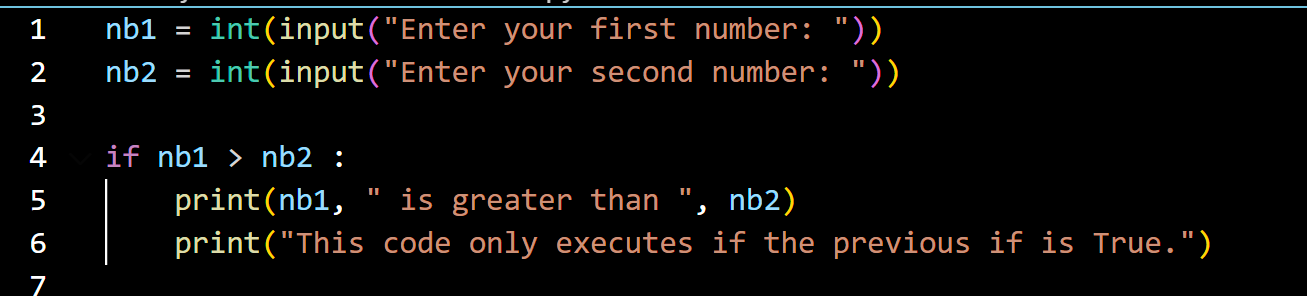
Whereas here, it will execute regardless of the result of the if because it is not indented "under" it:

and / or
It is also possible to refine a condition with the logical keywords and, and or.
Here is an example:
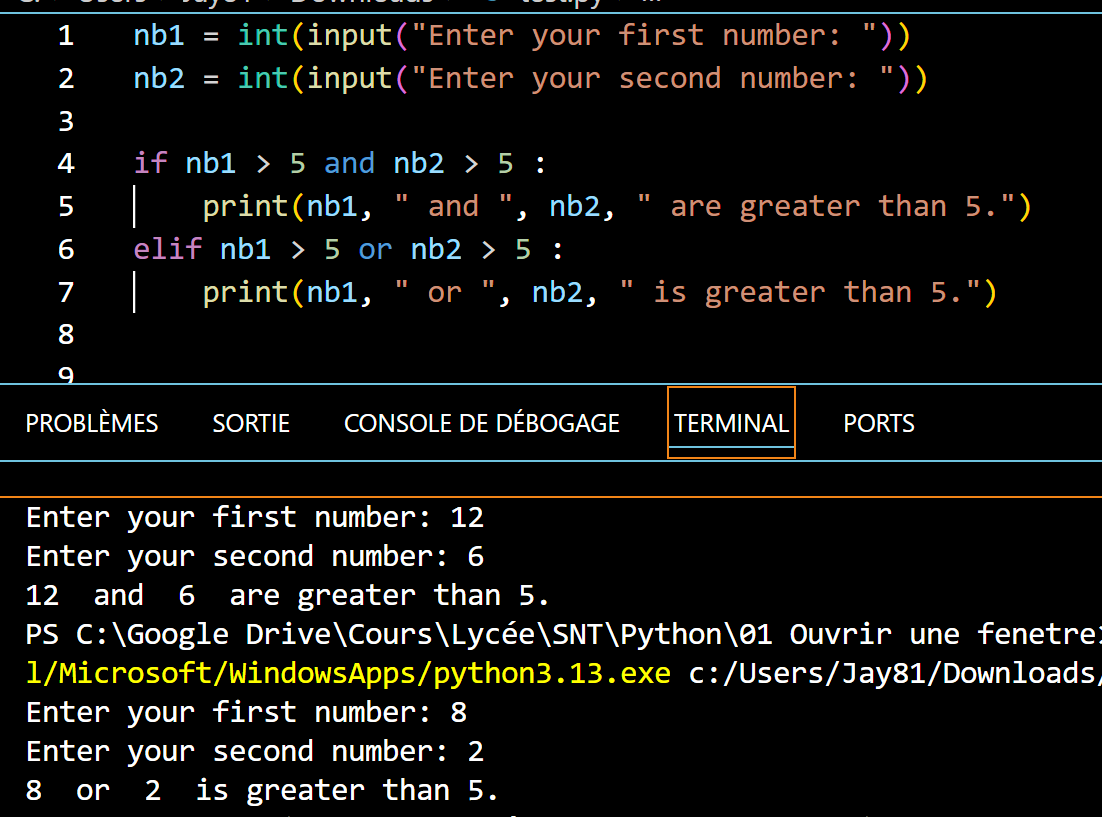
Now let's move on to a little more practice! 🤠
Exercise 8: Age control |
|
You will program a software that asks the user to enter their age. Next you will create 4 consecutive tests using if / elif / else. if the user is 18 or older, you will display: "Mature audience - unblocked content." Otherwise if (elif) the user is 16 or older, you will display: "Access to 16+ content." Otherwise if (elif) the user is 12 or older, you will display: "Access to 12+ content." Otherwise (else), you will display: "Access to content blocked."
|
Exercise 9 : Programmable shutters |
|
You will program a software that will ask the user to enter the time, as an integer: for example: 9 for 9am, 15 for 3pm. Then, if it is between 9am and 8pm (9 to 20 in 24h format), you will open the shutters by doing a print("Opening shutters.") . Otherwise, you will close them by doing a print("Closing shutters.") . |
That's it for this chapter! 😀
See you soon! ☺️